
Blue Keyboard DEMO2.1 - Get APK
You'll be able to download in few seconds.
Publisher Description
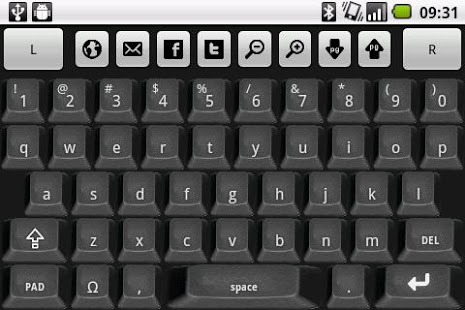
Blue Keyboard App converts your phone into a remote bluetooth keyboard. Also features a mouse pad control, zoom controls, easy text selection and page scrolling buttons, drag-drop operations and quick launcher buttons to open webbrowsers, mail, facebook and twitter pages.
Features at a glance:
- Multiple keyboard type in same application! Besides the conventional QUERTY keyboard, supports also Cyrillic, Greek, Korean, french AZERTY and German QUERTZ keyboards.
- Portuguese and Spanish QUERTY keyboard also available.
- Appealing key appearance, with adjustable keyboard buttons color.
- Digit keys ALWAYS shown at the top of the keyboard, as in a conventional pc keyboard, avoiding the need to keep toggling between digit/text mode.
- Shift characters are marked on the keys, allowing user to know in advance the character that will be generated when shift/caps lock key is on.
- Mouse pad function, including click and double click which can be achieved in same manner as in a normal pad.
- Mouse Lock Function, allowing text selection and drag-drop operations
- Quick browser page zooming buttons (also works in PDF file reader)
- Integrated page down / page up controls and cursor buttons
- Adjustable mouse speed.
- Remote Master Volume Control.
- Facebook and Twitter quick launcher buttons.
- Mail and Web Browser quick launcher buttons.
_____________________
Detailed Description:
This App offers you a very appealing keyboard. Keys layout are very representative of a normal computer keyboard.
It allows also to control master volume level of your windows OS system, by simply making use of your phone volume keys.
Need to often use different languages or keyboard types?
This App integrates multiple keyboard types which can be easily toggled during run time. Besides the standard QUERTY, you have Cyrillic, Greek, and Korean keyboards available. QUERTZ and AZERTY are available as well.
Don't like you current keyboard color?
No worries, you can change keyboard key color and background during runtime.
Troubles surfing in internet?
The integrated zoom controls and page up/page down buttons allow a easy control while surfing in the internet.
You can switch over to mouse pad mode, allowing you to move the mouse pointer on the screen.
You will find text editor read/writing a very easy experience as well. The cursor buttons functions (left,right,up,down) are also integrated in the mouse pad, allowing user to move to any text position without using the mouse function.
Mouse button lock function (activated with a long press on left mouse button), allows text selection and drag-drop operations.
In order to establish communication between your android phone and your computer, Blue Server software has to be downloaded and installed in your computer.
Blue server is free of charge, and can be downloaded from:
http://code.google.com/p/blue-server-project/downloads/list
Blue Server embraces a set of (currently) seven Apps available in the market. All Apps intend to give android users full control over windows OS controls and software, namely keyboard and mouse control, webbrowsing, powerpoint, media player and print screen functions.
For more information on other blue server apps, please refer to blue server guide, also available for downloaded at the below mentioned web site:
https://play.google.com/store/search?q=pt.teixeira.blueapps
NOTE:
Save money buying Blue Server Utility App. This App is a all-in-one utility, containing all blue apps at a very attractive pricing
https://play.google.com/store/apps/details?id=pt.teixeira.blueapps.BlueAll
About Blue Keyboard DEMO
The company that develops Blue Keyboard DEMO is Luis Teixeira. The latest version released by its developer is 2.1.
To install Blue Keyboard DEMO on your Android device, just click the green Continue To App button above to start the installation process. The app is listed on our website since 2012-04-16 and was downloaded 0 times. We have already checked if the download link is safe, however for your own protection we recommend that you scan the downloaded app with your antivirus. Your antivirus may detect the Blue Keyboard DEMO as malware as malware if the download link to pt.teixeira.blueapps.BlueKeyboardLite is broken.
How to install Blue Keyboard DEMO on your Android device:
- Click on the Continue To App button on our website. This will redirect you to Google Play.
- Once the Blue Keyboard DEMO is shown in the Google Play listing of your Android device, you can start its download and installation. Tap on the Install button located below the search bar and to the right of the app icon.
- A pop-up window with the permissions required by Blue Keyboard DEMO will be shown. Click on Accept to continue the process.
- Blue Keyboard DEMO will be downloaded onto your device, displaying a progress. Once the download completes, the installation will start and you'll get a notification after the installation is finished.
Program Details
System requirements
Download information
Pricing
Version History
version 2.1
posted on 2012-04-16
Several fixes and updates
version 2.1
posted on 2012-04-16
- Added new commands for web browser: Refresh, Back, Forward and Favorites (Blue Server 5.0 or higher required),- Reports when Blue Server upgrades are available.,- Add left mouse lock button functions to allow drag-drop operations and text selection. (Lock button activated with a long press).
Disclaimer
External Download
We do not host Blue Keyboard DEMO on our servers. We did not scan it for viruses, adware, spyware or other type of malware. This app is hosted by Galad and passed their terms and conditions to be listed there. We recommend caution when installing it.
The APK Download link for Blue Keyboard DEMO is provided to you by apps112.com without any warranties, representations or guarantees of any kind, so access it at your own risk.
If you have questions regarding this particular app contact the publisher directly. For questions about the functionalities of apps112.com contact us.
